

ClaudeMax
88%
The control room for your AI limits
UsageScope brings quotas, token activity, reset windows, rankings, profiles, and multiple accounts per provider to your menu bar or system tray.
 Codex
Claude
Codex
Claude
 Gemini
 OpenAI API
 Perplexity
 Grok
Grok
 Cursor
 GitHub Copilot
 OpenRouter
 DeepSeek
 Kimi Code
 Warp
Warp
 Amp
Amp
 Kilo
Kilo
 Augment
 JetBrains AI
Native usage cockpit
Short windows, weekly limits, API credit, local token history, and reset timing stay readable without opening another browser tab.
 Usage Overview
Monthly ranking arena
Choose a display name, add an avatar and profile message, follow rank history, and share the result anywhere.
UsageScopeLimits visible. Focus intact.
Challenger
16.1B
A live rank for every README
Copy one Markdown line. Your public profile and current UsageScope rank stay connected across GitHub and the web.
Open the public profile[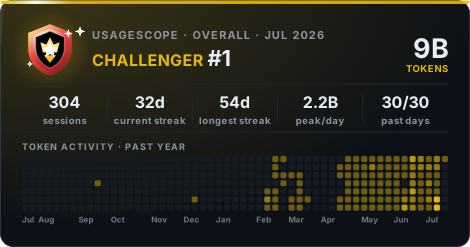](https://usagescope.com)Six months of context
Token history, quota thresholds, reset countdowns, and provider health turn scattered limits into a plan.
UsageScope warns you before the next run meets the wall.
Wait, switch providers, or keep moving with the right context.
Know whether the problem is your limit or the service.
Local-first by design
Credentials and history stay on your device. Ranking publishes only the profile and monthly summary you choose to share.
Read the privacy policyUsageScope for macOS + Windows
One native app for AI usage, rankings, profiles, badges, resets, and alerts. Free, with every feature included.

